CRM

Your customer on one card — not buried in spreadsheets.

The deal from your web form, the question dropping in on WhatsApp, last month’s quote — they all merge on one contact card. You read the history at a glance, move the deal through the pipeline and see satisfaction as a number. The era of customers lost between tabs ends today.

Contact card
with a timeline — every touch is recorded
Pipeline
deals stage by stage, drag and drop
Custom fields + tags
the card adapts to your sales process
500 cards
vCard digital business cards — on the free plan
01 / Capture

Every visitor passing through your site becomes a card.

You build the landing page, the form and the popup from one panel; every entry lands on your target list and a contact card opens by itself. With UTM capture on, you see how many deals each channel brought — source by source — and site events like add-to-cart flow into the same profile. Visitors don’t vanish; they become records.

CAPTURE CHANNELS
  • Landing page A campaign-specific page + form, no code.
    utm_source=google → list: spring-course
  • Popup Triggered by exit intent, scroll or a timer.
    trigger=exit_intent
  • Web form Connects to the form on your site; entries land on a list.
    form=quote-request → contact card
  • Site events Page views, clicks and add-to-cart flow into the same profile.
    event=add_to_cart → profile
Every entry → target list + contact card · source tagged via UTM
02 / Understand

Open the card — the customer’s whole story is right there.

Sent emails, incoming replies, WhatsApp messages and SMS line up on a single timeline; even the reply to a calendar invite (RSVP) is written to the contact’s history. Industry, region, source — you shape the card with your own custom fields and split contacts into segments with tags. “Who said what, and when?” closes in one glance.

CRMLIVE DRAWING
ECEmma Clark[email protected]customerlondonVIPOpened the emailMessaged on WhatsAppRequested a quoteQuote sentNEWIN TALKSWONWON ✓$48,000From business card to pipeline — no manual data entry.
SAMPLE CARD · MAYA CHEN
Industry e-commerce
Region Austin, TX
Source spring-landing
Tags customer · annual plan

You define the custom fields: industry, region, source…

  1. 09:14 Email opened — “Spring campaign”
  2. 11:02 WhatsApp: “Could I get the quote today?”
  3. 13:40 RSVP: demo invite accepted ✓
  4. 14:05 Internal note: quote sent — follow up Friday

Even the reply to a calendar invite (RSVP) lands in the history.

03 / Advance

A live pipeline: deals waiting on you surface themselves.

You name the stages after your own sales process; drag the deal from stage to stage, assign it to a teammate, mark it with tags like “waiting on support”. Changes apply to the whole team instantly. When the deal closes, the NPS survey kicks in — a dropping score shows up on the card, and you step in before the relationship cools.

SAMPLE VIEW · SALES PIPELINE
NEW
Nadia Rahman web form
Lena Weber demo request
IN TALKS
Northwind Retail enterprise
QUOTE SENT
Maya Chen annual plan
WON
Harvest Foods closed ✓
Rename stages, reorder them, add new ones — the process is yours.
The NPS feedback loop — 3 steps
  1. STEP 1 · SURVEY The survey goes out

    When a sale or support case closes, you send the contact a 0-10 NPS survey.

  2. STEP 2 · CARD The score lands on the card

    Score and comment accumulate on the contact card — and feed the reports.

  3. STEP 3 · FOLLOW-UP You catch the dip

    Filter contacts whose score dropped and put them on your follow-up list — before they leave.

04 / Share

Your business card is now a link — one tap to contacts.

At a trade fair, in a meeting, in your email signature: you share the link to your vCard-based digital business card, and the recipient adds it to their contacts with one tap. Paper cards get forgotten in drawers; the digital card lands in the phone book — and when you call, your name is on the screen. Give every team member their own card — 500 cards ready on the free plan.

DIGITAL BUSINESS CARD · VCARD
Elena M.
Sales Manager · Northwind Retail
Phone
+1 (555) 0·· ··18
Add to contacts
500 cards on the free plan
05 / Connect

From card to reply: four channels, one inbox.

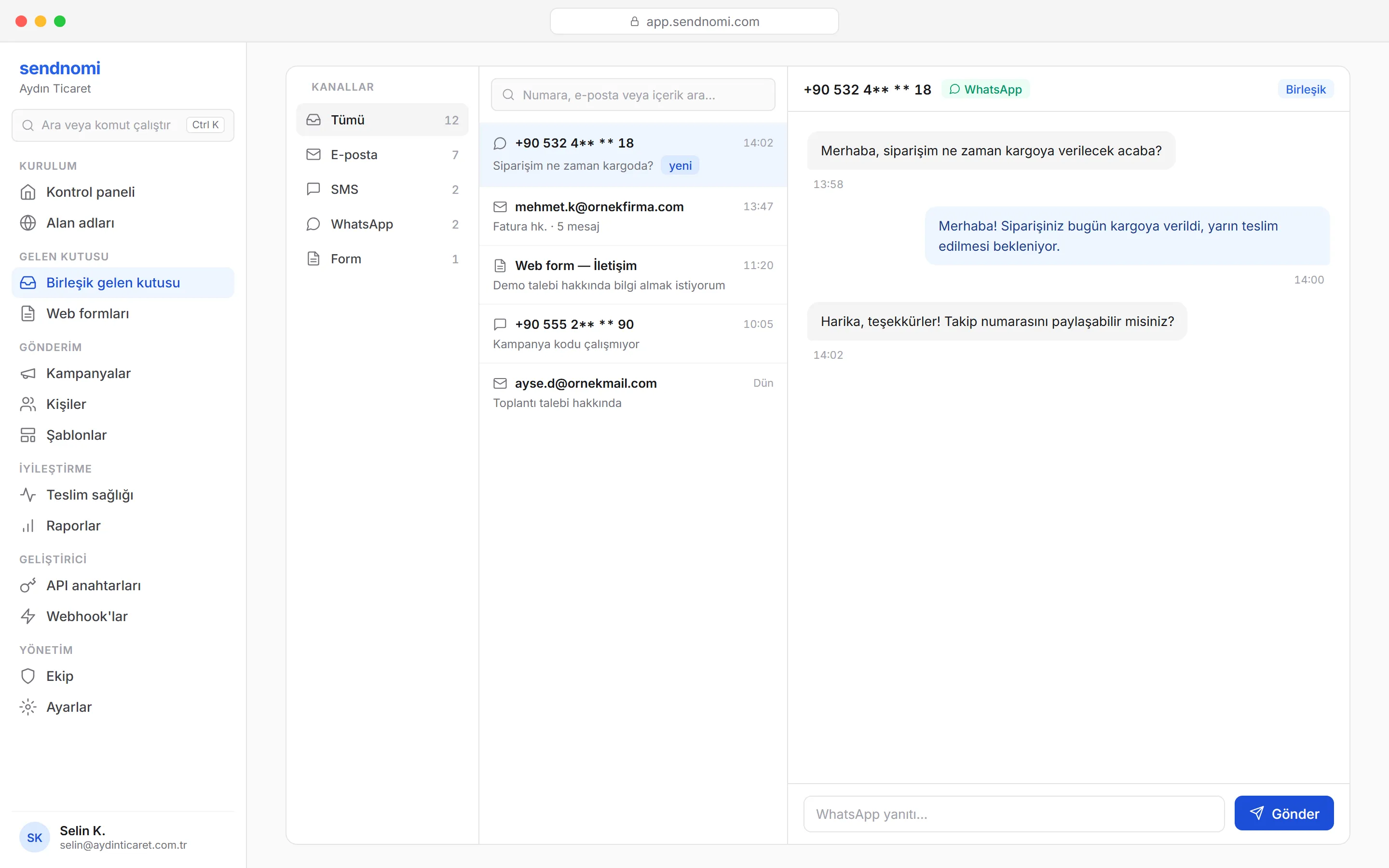
Where the contact card ends, the conversation begins: email, WhatsApp, SMS and web forms land in the same inbox, and conversations merge per customer. The AI assistant reads the history and drafts the reply — you just approve and send. The reply, like every other touch, is written to the contact’s timeline; the loop never breaks.

ONE INBOXLIVE DRAWING
EMAILWHATSAPPSMSWEB FORMINBOX · 4 CHANNELSEmma ClarkQuote requestJames WardOrder statusLena WeberDemo request✓ Answered · 41 secAssigned to EceAI ASSISTANTECEmma Clarkcustomerdrafting a reply…tone: formalSendFour channels, one inbox — AI drafts, you approve.
SendNomi unified inbox — email, SMS, WhatsApp and web form in one list; a WhatsApp conversation in the right panel

Same customer, two setups.

A scattered history costs you quietly: the forgotten quote, the unhappy customer noticed too late, the business card that never made it into anyone’s phone.

Spreadsheets + scattered notes

  • The customer history is spread across three spreadsheets, two phones and a notebook — “what did we last discuss?” is archaeology.
  • Nobody follows up on the quote you sent; the deal quietly goes cold and closes as “we forgot”.
  • Trade-fair business cards yellow in a drawer; the numbers never reach anyone’s contacts.
  • Satisfaction is measured by gut feeling; you notice the frustration only as the customer walks away.

SendNomi CRM

  • Every touch — email, WhatsApp, SMS, web form — sits on one card, in time order.
  • The deal waits in the pipeline with its stage; customers waiting for a quote surface themselves.
  • The digital business card is shared as a link and saved with one tap — 500 cards on the free plan.
  • The NPS score accumulates on the card; filter the dips and step in before the customer leaves.
GET STARTED

Your first send within minutes.

Create your free account — 500 sends per month, forever.